
Canvas Overlay
Design your own overlay freely — put gift cards, images and text anywhere on a 16:9 or 9:16 screen, with ready-made templates and animated effects.
Free download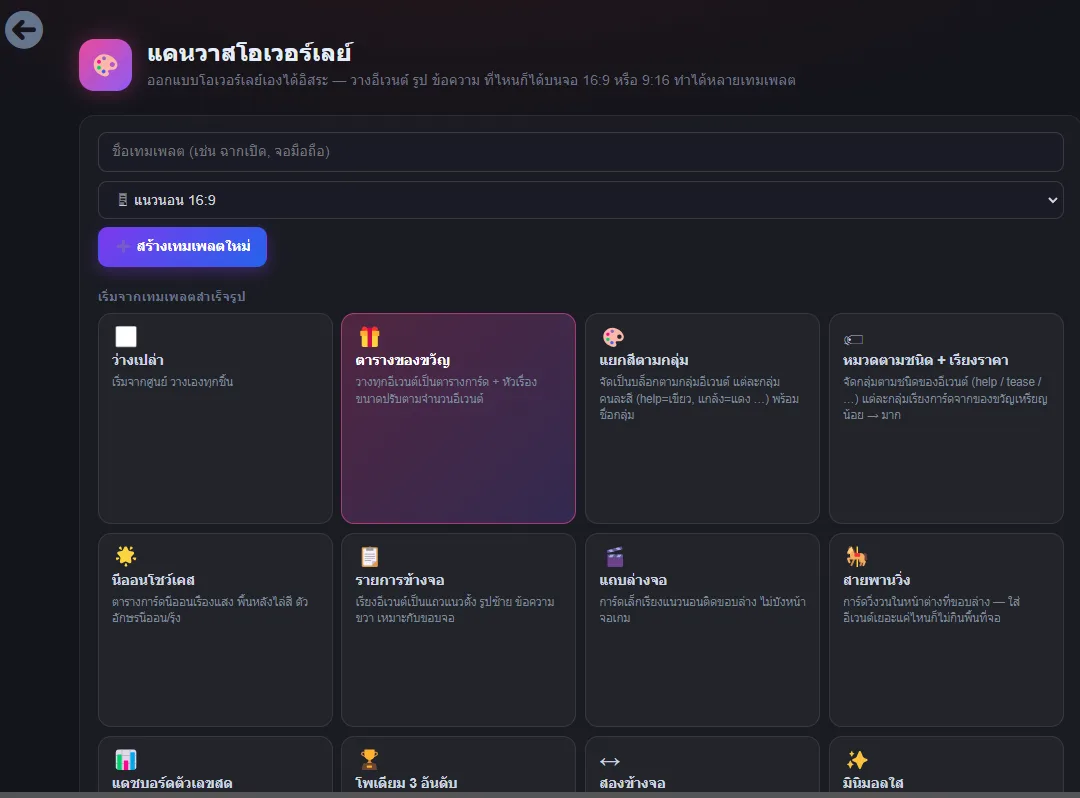
Start from a ready-made template or a blank canvas, then drag, resize and style every piece. Each card shows a gift (or like, follow, comment…) and what it does on your LIVE, so viewers know exactly what to send.
What can Canvas Overlay do?
A free-form overlay designer built into Tik To Earn. It reads your Action & Event setup, so every card already knows its gift, picture and action — you only decide how it looks and where it sits.
16:9 or 9:16
12 ready-made templates
Place anything anywhere
35 group effects
Colours, fonts and themes
Export to PNG
One Browser Source URL
Free: 1 canvas · Pro: unlimited
How to use it
- Set up your gifts and actions first in Action & Event
- Open “Canvas Overlay” in Tik To Earn, name it and pick 16:9 or 9:16
- Start from a template or a blank canvas
- Drag, resize and style the cards, images and text; add group effects
- Copy the overlay URL and add it as a Browser Source in TikTok LIVE Studio or OBS
FAG
Is it free?
Yes — the free plan includes 1 canvas. Pro lets you keep as many canvases as you want.
Do I need design skills?
No. Pick one of the 12 templates and it is ready to use; change only what you want.
Where do the gift cards come from?
From your Action & Event setup. When you change an action, the card on the overlay updates too.
Does it work for vertical (phone) streams?
Yes — choose 9:16 when you create the canvas.